AI Immunization Records for Camps: Every Vaccine Record, Read and Organized
Every spring, a stack of vaccine records lands on your health director's desk: photos of yellow cards, multi-page pediatrician printouts, state registry forms. Campium's new immunization add-on reads those records for you, lists every dose for your health director to confirm, and lines each camper up against your state's camp requirements.
The problem with vaccine records at camp
Collecting immunization records is the easy part. Families upload them with the rest of their health forms. The hard part comes after: someone has to open every file, find the vaccine history somewhere in a four-page physical, and work out whether each camper has what your state requires.
That work tends to land late, close to opening day, when there is no time left to ask a family for a missing dose. And the campers who never uploaded anything are the easiest to miss, because there is no file to open.
What Campium does
1. Reads the record so you do not type it in
Families upload their child's vaccine record on the health form you already use. In Form Settings, you mark that form as one that collects immunization records. From then on, Campium's AI reads each upload and pulls out every dose: the vaccine, the date, and the product when it is listed. It also picks up lab titers that show immunity and any exemptions on file.
Need a standard form for families who do not have one handy? You can offer Campium's blank immunization record right on your immunization form.
2. Your health director checks the work
Every extracted dose shows up next to the original document. Your health director can confirm it, correct it, or reject it with one click. Show me where jumps straight to the spot on the page the dose came from, so checking a line takes a glance instead of a hunt through the file.
Campium flags anything it is unsure about, with the reason: a date it could not fully read, a low-confidence entry, an unreadable section, or a name or birthdate that does not match the camper. Corrections are saved as a new version, and the original reading is kept, so you always have a record of what changed and who changed it.
3. Lined up against your state's requirements
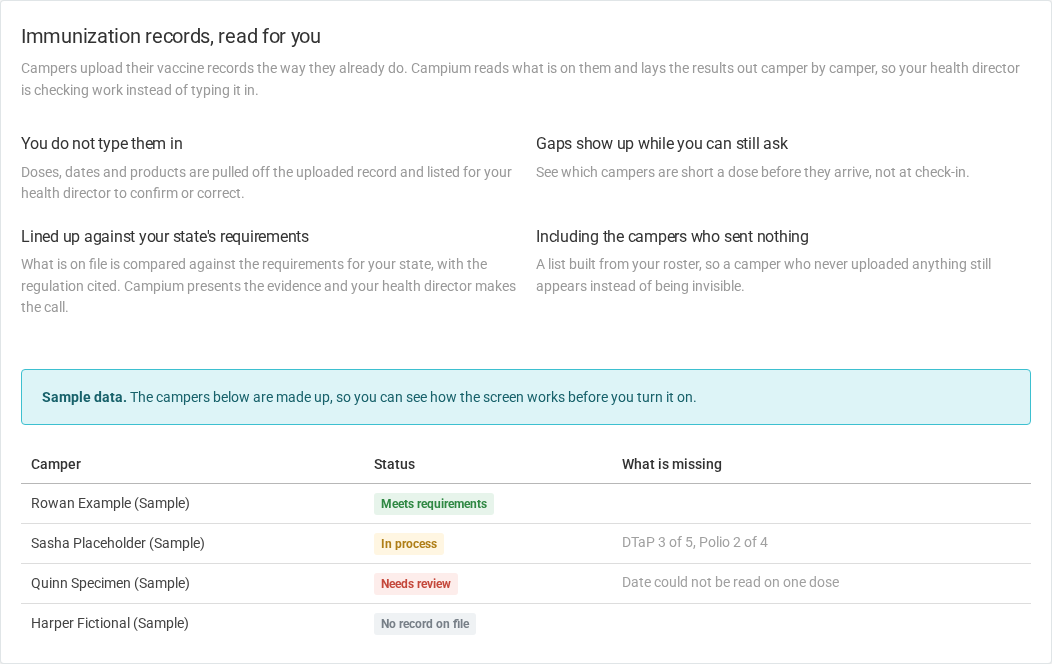
Campium compares what is on file against the requirements for your state, with the regulation cited. Each camper lands in one of a few clear statuses:
- Meets requirements: the record shows enough doses of every required vaccine for the camper's age.
- In process: the camper has started a series but is short a dose, for example "DTaP 3 of 5."
- Needs review: something needs a human look, such as a missing vaccine, an unreadable date, or an exemption.
- No record on file: the camper is on your roster but nothing has been uploaded yet.
Statuses update as soon as your health director confirms or corrects a dose. You can export the whole list to CSV for your files or a health department visit.
4. Gaps show up while you can still ask
Because records are read as they arrive, you can see which campers are short a dose weeks before opening day, not at check-in. That leaves time to reach out to families while there is still time to fix it.
5. Includes the campers who sent nothing
The Campers view is built from your roster, not from the uploads. A camper who never sent a record still appears as No record on file instead of quietly slipping through.
Campium presents the evidence. Your health director makes the call.
This is the most important thing to know about the feature: Campium never decides on its own that a camper passes or fails. It organizes the evidence and shows its work. Your health director has the final say on every camper.
The safeguards are built to lean toward a human review whenever there is any doubt:
- It never marks a camper "failed." Anything short of clearly meeting the requirements goes to In process or Needs review.
- Exemptions always get a human look. A camper with a medical exemption on file goes to Needs review, even if every dose is there.
- Age matters. Requirements are checked against the camper's age. For example, the Hib series ends at age 5, so it is not counted against older campers.
- No birthdate, no guess. If a camper's birthdate is missing, Campium cannot check age-based rules, so the camper goes to Needs review.
- Immunity counts. A lab titer showing immunity satisfies a vaccine where your state accepts it, and a physician-documented history of chickenpox counts for varicella.
One limit to know: Campium counts doses against each requirement. It does not yet check the spacing between doses on the catch-up schedule. That is one more reason your health director reviews every camper before anything is final.
State camp immunization requirements vary a lot
There is no single national rule for camp vaccines. Each state handles it differently, and the differences matter for what software can and cannot tell you:
| How the state handles it | Example |
|---|---|
| The camp regulation names each required vaccine | New York (10 NYCRR Subpart 7-2.8) |
| The camp rule points to the state school or childcare schedule | Colorado, New Jersey |
| Camps must collect and keep immunization status, with no list of required vaccines | Michigan |
| The camp code does not address immunization | Maine, Pennsylvania |
Campium only compares campers against a state's rules after we have verified them, and New York is first. We are adding states as we verify them. If your state is not on the list yet, or does not set a camp requirement at all, Campium still reads and organizes every record, keeps it with the camper's profile, and gives your health director the same review screen. Your health director simply checks the doses against your camp's own policy.
Some states also let families claim non-medical exemptions, and some only allow unvaccinated campers to be excluded during an outbreak. Check your state's current rules with your health director or camp counsel. Campium will not paper over those differences.
Privacy and security
Vaccine records are protected health information, and the feature is built to treat them that way:
- Every view is logged. Each time someone opens the list, a document, or a page image, Campium records who looked and when.
- Documents stay private. Page images are only shown to signed-in staff at your camp. They are never shared through a public link.
- Only the people who need it. Access is limited to admins and staff you give the immunization permission, such as your health director.
- Only the vaccines that matter for camp. Vaccines camps do not need, like HPV and COVID-19, are left out of the review.
How to get started
Immunization is an add-on you turn on from the Immunization item in your Campium menu. Before you turn it on, you can open a preview that shows the real screen with sample campers. When you turn it on, you set a spending limit for each season so a busy season cannot run past what you planned. Reading pauses when you reach the limit, and you can raise it at any point.
It works alongside the rest of your health center, medication tracking, and health forms, so your health director has everything in one place. For more on running a strong health center, see Hiring and Managing Summer Camp Nurses Like a Pro.
Common questions
Does Campium decide whether a camper is compliant?
No. Campium reads the record, organizes it, and compares it against your state's requirements. Your health director reviews the evidence and makes the call.
What happens with handwritten or blurry records?
Anything Campium cannot read clearly is flagged, with the reason, and the camper goes to Needs review. It does not guess.
What about medical exemptions?
Campium records the exemption, but a camper with an exemption on file always goes to your health director for review. An exemption never produces an automatic Meets requirements.
Do families have to do anything differently?
No. They upload their child's vaccine record on the health form you already use. You can also offer a blank Campium immunization record for families who need one.
Next steps
Already a Campium customer? Open Immunization in your menu to see the preview. New to Campium? Book a demo and we will walk you through immunization records alongside the rest of the platform.