Camp Lunch Ordering: 8 Ways to Use Food Menus in Campium
Paper lunch forms, cash in envelopes, and a kitchen guessing how many trays to make. If that sounds like your camp, food menus in Campium let families order meals by the day and give your kitchen an exact count every morning.
Food is one of the few things every camper needs every single day, and it is also one of the hardest to plan. Families want choices. Your kitchen wants numbers. Your office wants the money collected before the food is made, not chased afterward.
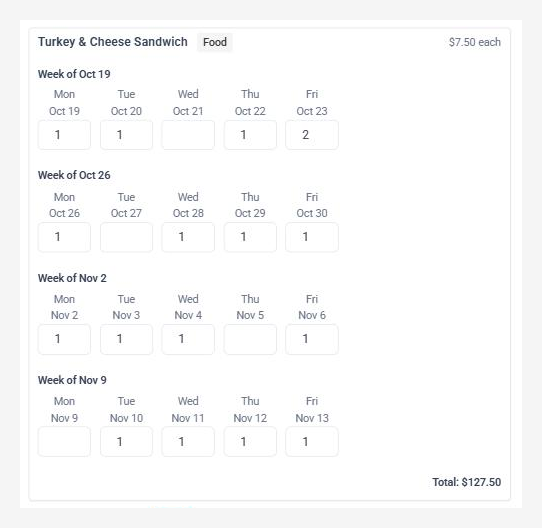
Campium handles this with food products. You add a menu item, set its price, pick the weeks and days it is served, and choose how far ahead orders close. Families then pick a quantity for each day on a simple weekly grid, and every order lands on the family's account and on a daily fulfillment report.
How it works in three steps
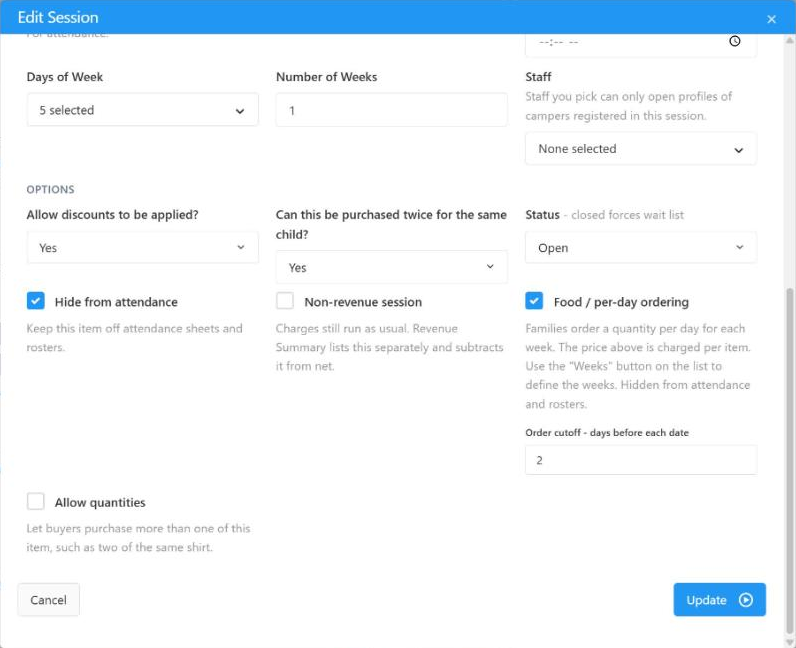
1. Build the menu. Create a product for each item, turn on Food / per-day ordering, and set the price per item. Add the weeks it is offered and which weekdays it is served. A pizza lunch can run Fridays only while a sandwich runs every day.
2. Set the cutoff. Choose how many days before each date ordering locks. You can also open and close each week on its own schedule, so next week's menu goes live only when your kitchen is ready.
3. Families order, the kitchen cooks. Parents choose a quantity for each day. Each item is charged at its per-item price, and the Food Fulfillment report totals every item by date.
8 ways camps use food menus
1. A daily hot lunch program
The classic use. Offer two or three entrees each day and let families order for the whole week at once. Because each date locks on its own, a parent who forgets on Sunday can still add Thursday's lunch on Monday.
2. Pizza Friday and other theme days
Limit an item to a single weekday and it shows up only on that day of the grid. Pizza Friday, Taco Tuesday, and a cookout on the last day of a session are all just products with one weekday turned on.
3. Afternoon snack packs
Not every food item is a full meal. A low-priced snack pack served every day is an easy add-on for families with campers who stay for after care, and it removes the "who brought snacks?" question at 3 p.m.
4. Dietary and allergy-friendly options
Give vegetarian, gluten-free, or nut-free meals their own menu items. The kitchen sees those counts as separate lines, so special meals get made in the right numbers instead of being improvised at the serving line.
5. Bagged lunches for field trips and out-of-camp days
Add a trip lunch for the specific week of an outing. Families order it alongside the trip, and your staff know exactly how many bags to pack before the bus leaves.
6. Breakfast for before care
Early drop-off programs can sell a simple breakfast item on the same grid. One order flow covers breakfast, lunch, and snack.
7. School-year and after-school programs
Weeks are just date ranges, so food menus work the same way during the school year. Run a rolling lunch program for an after-school site, opening each week's menu a few days ahead.
8. Special events and family days
Visiting day barbecues, end-of-summer banquets, and family nights can each be a one-day menu item. You collect payment up front and get a headcount for the caterer from the same report.
Kitchen counts without the spreadsheet
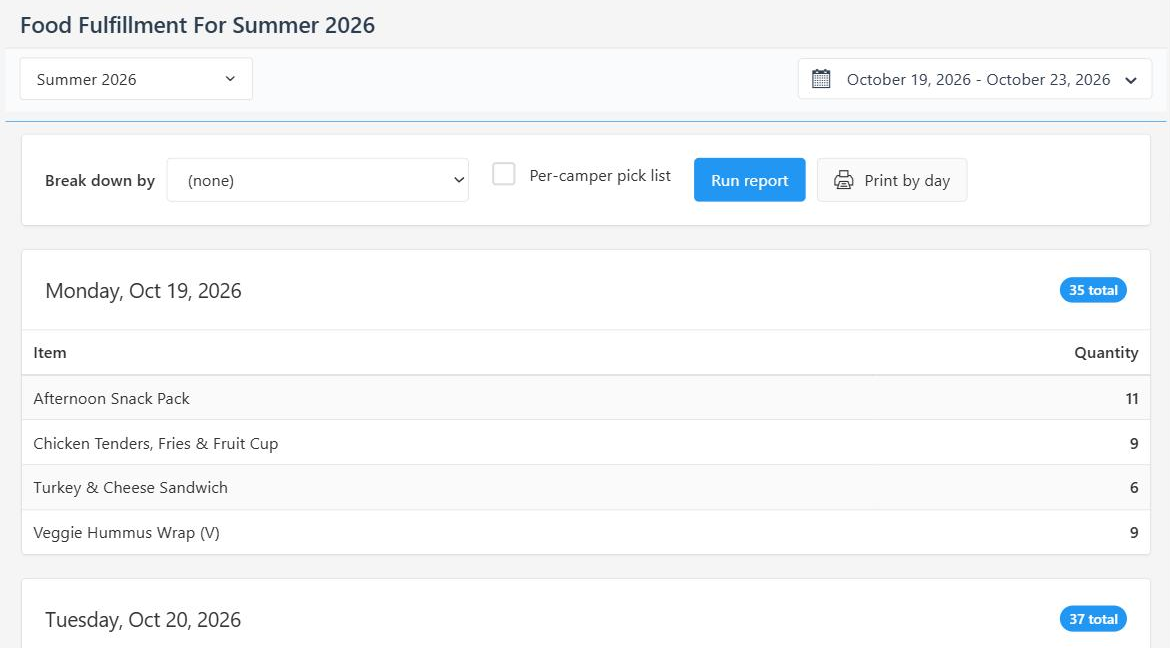
The Food Fulfillment report lists every date in a range with the total of each item to prepare. Break it down by any profile field, such as bunk, group, grade, or site, so each counselor or lunch table gets its own list. Turn on the per-camper pick list to see who ordered what, and use Print by day for one page per group per day to hand to the kitchen or tape to the cooler.
Billing that keeps up
Food orders post to the family's account like any other purchase, so they show up in balances, payment plans, and statements. You collect before the food is made. When a family needs a change after the cutoff, your office staff can still edit the order from the camper's profile. Days that have already been fulfilled stay locked so the record stays accurate.
Part of your full camp management stack
Food menus use the same products, seasons, and family accounts as the rest of Campium. They work alongside registration, billing, and the parent portal, so meals are not a separate system to reconcile at the end of the summer.
Next steps
See food menus alongside the rest of the platform on our features page, or book a demo and we will build a sample lunch menu for your camp during the call.