Camp Staff Scheduling Software
Build and manage the summer schedule in a calendar view. Assign shifts by department, track open positions, and jump to any staff member's profile directly from the scheduler - no spreadsheet required.
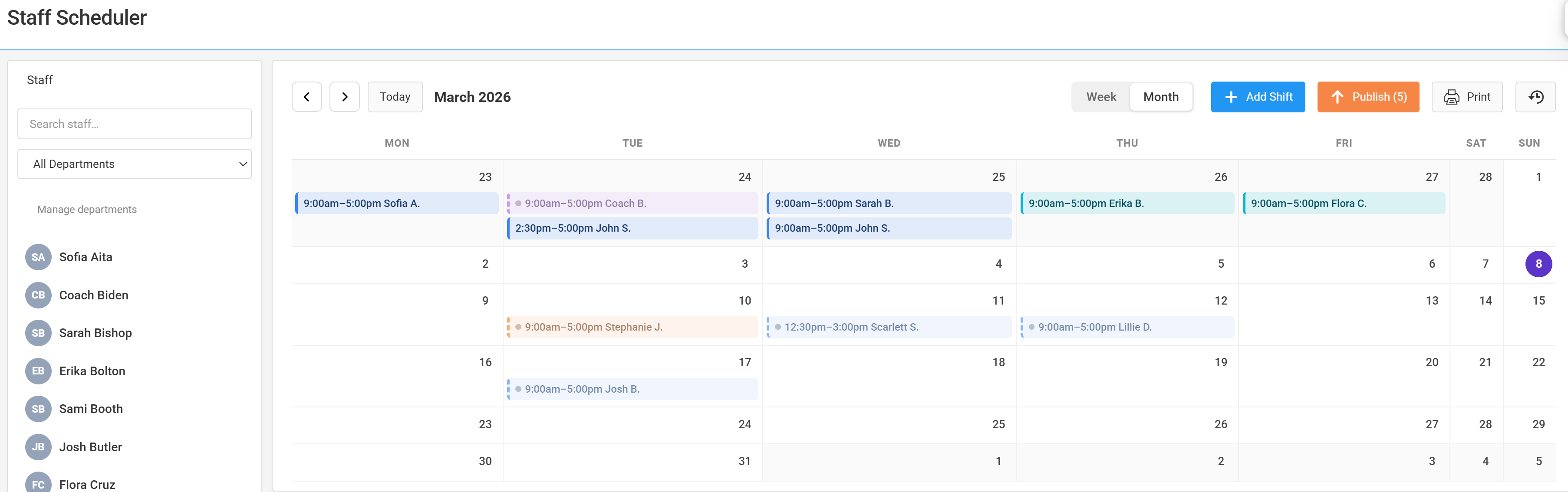
What the Campium staff scheduler includes
Week and month calendar views
Toggle between weekly detail and monthly overview. See who's covering what across the full season at a glance.
Shift assignment by department
Organize shifts by department for cleaner coverage tracking. Filter the calendar to view a single department without noise from others.
Open position tracking
Mark shifts as open to track coverage gaps. See unfilled positions at a glance before the season starts.
Click-to-edit shift details
Click any shift on the calendar to open and edit details in a modal - start time, end time, assignment, and notes - without leaving the scheduler.
Direct link to staff profiles
Jump from a shift directly to that staff member's full profile - contracts, contact info, and documents - in one click.
Staff contracts and forms
Staff complete contracts and forms through the same portal as parents. Everything in one system - no separate onboarding tool needed.
Scheduling that lives alongside your camper data
Most camps run their staff schedule in a spreadsheet completely separate from their camper software. Campium puts both in the same platform - so when you're building the schedule, you can see enrollment by session, check camper-to-staff ratios, and access staff profiles without switching systems.
- ✓ Scheduler and camper data in the same platform
- ✓ Staff profiles with contracts, documents, and contact info
- ✓ Roles and permissions control what staff can see
- ✓ Staff use the same portal as families - no extra logins
- ✓ Unlimited staff at no extra cost

Related features and resources
See the staff scheduler in action
We'll walk through shift assignment, department views, and staff profile access with your setup in mind.
Book a demo